
Have you set up your payment processor correctly?
There were some very important points made in the latest webinar we posted at:
https://1kadaystrategies.com/hrs-webinar-dr-lieven-14-april-2013/
And a few questions have been raised that need further clarification in the Skype groups.
So this update is to help you understand what is needed for the smoothness of getting paid out by HRS and any other program you are in.
So lets look at the payment processors that are out there and what information you need to make sure HRS and any other program can pay you without issue.
WHAT YOU NEED FROM YOUR PAYMENT PROCESSOR
With each program they pay you via your payment processor via Ecurrency.
So for example with SolidTrustPay your account level dictates how much you can receive in Ecurrency.
- An Active Account can only receive $250 per day
- A Card Verified can only receive $500 per day
- A Standard Verified can receive $9999 per day
- A Bank Verified can receive $9999 per day
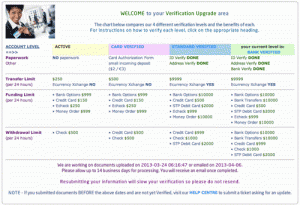 So it is important with SolidTrustPay and the other Payment Processors for you to make sure you get your account verified at the higher levels so that as your account grows you can actually receive your withdrawals at larger sizes.
But lets be clear on the exact information you need to have entered in your program to make sure you can receive your withdrawals with out problem.
SOLID TRUST PAY
With SolidTrustPay you need to make sure that you have to use your USERNAME to receive your withdrawals. Your user name IS NOT your email address.
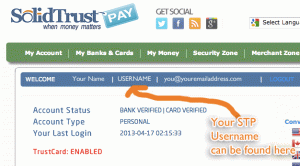 When you sign up for SolidTrustPay (STP) at http://stpinvite.com it is very important to make a note of the USERNAME you have to create. This username is CASE SENSITIVE, so make sure you make an accurate record of this.
If you already have an STP account you can find your username by logging in and then hover over:
‘MY ACCOUNT’ in the green menu bar.
Then select ‘Account Overview’.
This will take you to a page as shown in the image above.
It will say WELCOME in a blue header section.
Your USERNAME is just after your name. This is your LOGIN USERNAME that you have to use to actually login to STP (SolidTrustPay).
This Login USERNAME is what you enter at HourlyRevShare, BriscoFunds etc… so that they can send withdrawals to and receive funds from SolidTrustPay.
And again, as stated in the webinar a number of members of HourlyRevShare did not receive their withdrawal amounts because they had not entered their SolidTrustPay username correctly in the HourlyRevShare system.
So please check now that you have your USERNAME entered correctly at HourlyRevShare by going to ‘edit profile’ in your HourlyRevShare dashboard. Make sure you check the details in each of the other programs you are a member of too.
If you want any support in maximising your verification levels in SolidTrustPay you are welcome to get in touch and I will guide you through the process.
You can signup to SolidTrustPay by clicking here: STPinvite.com
Here are a few more tips on signing up with STP – CLICK HERE
 EGOPAY
With EGOPAY you need a PAYZA account to fund it.
In HourlyRevShare and every other program you are in you will need to use your EgoPay login email address for you to fund and withdraw from your programs.
You can signup to EgoPay by going here: EGOPAY.com
PERFECTMONEY
 PerfectMoney is a Panamanian payment processor which does not reveal all it’s charges until you are signed up with the processor.
In HourlyRevShare and every other program you are in you will need to use your USD account number. This number is within your Perfect Monkey dash board and begins with ‘U’. So the number will be UXXXX.
PerfectMoney gives you 3 accounts when you sign up.
One in Gold as the currency.
One in USD as the currency.
One in Euro as the currency.
HourlyRevShare and most other programs all work in USD so you need to enter your USD account number if you are using PerfectMoney as your payment processor.
If you need to signup with PerfectMoney you can sign up here: PERFECTMONEY.com
LIBERTY MONEY
HourlyRevShare have stopped using Liberty Reserve due to security risks with their accounts and reliability of payouts. Many users I have spoken to have also reported they have struggled to take funds out of LR, but many other have found it works well for them.
With Liberty Reserve you can not use it with HourlyRevShare but it may be acceptable for other programs. Here again like PerfectMoney you need to use your USD account number, which is UXXXX.
BE PREPARED – and GET PAID
Just this week 5000 people did not receive their withdrawal payments from HourlyRevShare because they had entered the wrong details for their payment processor in the HRS system and some had not got their payment processor verified in full before requesting a withdrawal. Because of this their payment processor refused to receive the funds HourlyRevShare was trying to send to them.
These delays and holdups are not necessary. They are frustrating for account holders and admin staff alike.
Take 5 minutes now and check that each of your programs have the correct payment processor details entered.
Take another 5 minutes to make sure that you are fully verified or at least in the process of being fully verified with your payment processor.
If you have any questions feel free to get in touch. When it comes to being fully verified get in touch with your payment processor and see what is needed to get it done.
Do not put it off. Get it done. It only needs doing once and then the weekly and monthly funds you will choose to withdraw from your most successful programs will come to you with ease and without holdup.